Xiaomi Mi4c Leaked To Come With Type-C USB port and Even More Internal Storage

It was earlier reported that Xiaomi Mi4c is going to carry a price of less than $250, which is a steal of a deal considering that you will get a smartphone running a Snapdragon 808 chipset in it.

Windows 10 for phones features revealed

Microsoft showed off a number of new features for Windows 10 on phones today, but in afternoon sessions at the company’s press event. Most of the demonstrations focused on improving the built-in apps and features of Windows Phone, and fixing a lot of the oddities. That includes mail, maps, photos, Skype, and messaging.

Windows 8 and Windows 7 would receive a free upgrade to Windows 10

Once the OS launches later this year, Microsoft announced that all users who are using- Windows 8 and Windows 7 would receive a free upgrade to Windows 10 . With the release of the January Technical Preview, Microsoft is testing one of those systems.

Windows 10 build 9926 installation process

If you are installing the Windows 10 build that was released today, you will notice that the installation screens have been slightly changed or updated since Windows 8 and even over 9879, to a small degree. Since we know you don't install Windows builds frequently, we snapped some screens while installing the OS that you can see at the bottom of the post.

Whatsapp launches the Web client

Today WhatsApp announced a web client that will enable users to use the world’s most popular mobile IM client on their PC and Macs. But this web Client works only in the Google Chrome browser.

Saturday, 17 May 2014

Temple Run 2 : Now for 512 MB Windows Phones

Remember when Temple Run 2 came out in December with Xbox Live? It launched without support for low-memory devices like the Lumia 520. That changes today with the latest update for Temple Run 2. Head into the Windows Phone Store and you’ll be able to pick up Temple Run 2 for your 512 MB Windows Phone.

Temple Run has been updated to version 1.9.1.0. We’re not seeing any feature changes to the game, but that doesn’t really matter since millions of Windows Phone owners finally get access to the game. Do let us know if you notice anything else new with the update, but so far this looks just to be about giving access to those with low-memory devices.

Download Temple Run 2 from the Windows Phone Store


Source : WPcentral.


Tuesday, 13 May 2014

Redirect To Any Website Using Google Url


Today i will show you to make google link that redirects you to any webpage you wish. This url will start with www.google.com and followed with some characters and symbols. You can trick users to visit your site by changing your webpage url that look like google. As no one will doubt google. So lets get in to.

How To Redirect Any Site From Google ?

1. Go to Google Redirect Exploit
2. Enter Your Url in the input box as shown below

3. After entering the url click on submit and Google's url will be generated in the textarea as show below.
                             
4. Now you can use that url and upon visiting that url you will be redirected to your site.

Twitter- Now Mute those post which you don't want to see

People who are having Twitter account sometime follow those people whose post or tweets or retweets they really don't want to see or read, so for those twitter announced the all new feature named "mute" which will enable the users to mute post or tweets they don't want have on their feed.


Muting a user on Twitter means their Tweets and Retweets will no longer be visible in your home timeline, and you will no longer receive push or SMS notifications from that user. The muted user will still be able to fave, reply to, and retweet your Tweets; you just won’t see any of that activity in your timeline.
The nice thing is that the muted Twitter user won't have any idea that their messages can no longer be seen. Of course, muted users can be "unmuted" at any time. Twitter plans to roll out this new feature in the coming weeks to web users, along with iOS and Android clients. There's no word yet on if these features will be enabled for the Windows 8 and Windows Phone platforms,  Twitter's blog post.

This is a latest change Twitter has made to its services.


Source: Twitter | Neowin


Update your Evernote app with a new document camera

Today the Evernote for windows phone got an major update. It has bumped its popular note taking platform to version 4.4.0.1122 in Windows Phone Store today.


This update contains "numerous  bug fixes and enhancement" in a new document camera. The document camera allow the users to digitize both single and multiple page documents, so they can be added to any note in evernote.

Update your Evernote from windowsphone store .

Saturday, 10 May 2014

Quick launcher - makes your apps always handy


Few days ago a all new app has been arrived in the windowsphone store, named 'Quick Launcher' which makes your favourite apps always handy.

Using this you can able to switch your favourite apps faster and easier.  You can switch your apps with a simple swipe to access to action center, but after applying "clear all" all the shortcuts of quick launcher just disappeared from the action center.

It is a nice app for windowsphone8 but it need some improvement or update, it has a bug, when you open any app via quick launcher, if corresponding app is not installed then it crashes (show search for app for less than a second then crashes). And, it require such API that user itself make there own shortcuts to the launcher. And last  Users Interface must be updated or improved.


Download your app here: http://www.windowsphone.com/s?appid=4d82c4fb-a4a5-4130-a4de-6d66a7e90427


Source:windows phone

Tuesday, 6 May 2014

Desktop Curtain - Hide your clutter

Choose your focus

Desktop Curtain displays a stylized curtain or image that you can use to cover as much—or as little—of your screen as you'd like. You can place the curtain or image…
  • Behind the icons on your desktop, so it acts like a desktop image.
  • On top of your desktop icons, instantly hiding the clutter.
  • Behind the frontmost application, hiding everything but that application.
  • On demand, behind the frontmost window to focus your attention on just that window.

Choose your look

In addition to its built-in curtain, Desktop Curtain can use any picture file, the current OS X desktop picture, or a solid color as its curtain; the choice is yours.
Choose a curtain, an image, or a solid color
You can easily change the color of the stylized curtain, or of any image with translucency.
Desktop Curtain also keeps track of your last 10 used images, making it simple to choose from recently-used images.

You're in control

Desktop Curtain's settings give you full control over when and where you'll see its curtain (or image).
  • On multi-monitor Macs, choose between the display with the menu bar or all connected displays.
  • If you use Desktops (Spaces), choose whether Desktop Curtain shows on all Desktops, or just the current one.
  • Optionally hide Desktop Curtain when entering Mission Control (Exposé).
The Curtain settings tab
You also control the appearance of any images you use as curtains: their axes can be scaled proportionally or independently, or they can be centered or tiled.

Flexible features

Desktop Curtain can be run in any of three modes (standard application, menu bar icon, or completely invisible), and offers fast access to its key features via a contextual menu on the curtain itself, via Dock pop-up menus, or via its menu bar icon's menus.
You can define global hot keys to toggle the curtain's visibility or to isolate the frontmost window, and setting Desktop Curtain launch at login (with its curtain optionally hidden) is as simple as checking a box.
The Advanced settings tab
There's even an optional 'boss mode' hot key that will cover everything, including the Dock and Command-Tab switcher.

Friday, 2 May 2014

Steps To Downgrade From IOS 7 To IOS 6


As soon as the IOS 7 launched out in the market there were many users that want to upgrade their software from IOS 6 to IOS 7. All those who make the finest use of iPhones, touch iPads and iPods at some point of time they make the best use of it. Both of these devices are best at their own place as they allow the users to experience with the fun and interesting applications in the quicker and faster way. Now the main question is that for all those users who have installed their smartphones with the IOS 76 they want to upgrade their devices with the IOS 7 for sure.
In this article we will going to give away the explanation of step by step functioning through which the users can upgrade from their IOS 7 to IOS 6.

Step no 1: If you have already saved or stored with the iOS 6.1.3/6.1.2 blobs. In the very beginning you have to do this by running your iTunes of 11.0.5. For example if you are making the use of any previous version of iTunes like 11.1x then you have to install it one more time. This is one of the basic facts that when you are starting with the iTunes 11.1 Apple then the Apple does not have the capacity to store any other firewall files from the iTunes. Before installing it then you have to make sure that you have all the devices turned off such as Apple Cellphone Device, the Software’s etc.
Step no 2: Now in the second step you have to restart with all the functioning process so that you can wash out all the traces of previous software’s and download the iTunes 11. 0. 5 from the older applications.
Step no 3: Now in the third step you have to search for the latest version of iFaith and along with it download iOS 6.1.3 for te sake of iPhone 4. At this moment you have to save the SHSH from the place right where you saved it and you will have to retrieve it.
Step no 4: In the last and final step you have to start up with the iFaith and then click on to “build” signed ISPW w/blobs. After clicking with this option you will start upgrading from IOS 7 to IOS 6 and in this way your process of upgrading will all came to an end.
So all the users out there just follow these four steps right now and upgrade your IOS 7 to IOS 6….
                                                                                                                            Post by: Shubham

Why Glance screen flipping upside down ??

After releasing the app "Remote Desktop Preview" for Windows Phone, a few users have been experiencing an odd problem for which they may not know the cause: their Glance screen on their Lumia flips upside down.


There is the conflict when using Glance and Remote Desktop. When Remote Desktop Preview is connected and in landscape mode where the bottom of the screen is on the left side of your phone that time the bugs occurs .


Some other users also reports the same problem with Microsoft's new Movie Moments app.

How to fix upside down Glance screen


  •      If you rotate Remote Desktop to be landscaped/flipped to the right side, your Glance screen will go back to normal without the need for a soft reset.
Have any of our readers been affected by this issue? Let us know below.

Source: wmpoweruser

Thursday, 1 May 2014

Foursquare announces Swarm, its new app for checking in

Foursquare has announced that they are going to launch their all new app called SWARM this summer.  Foursquare is for explorers who want to know about the best spots, and to share what they’ve found with others. Swarm is for people who want the fastest and easiest way to connect with their friends,Swarm aims to facilitate meet-ups with friends more easily by letting you broadcast where you're going next and what your friends' plans are.

"We built Swarm because you’ve told us how often you still have to text your friends: “where are you?” and “what you up to later?” We wanted to build a quick way for you to know these two things for all of your friends. With Swarm, you can easily see which of your friends are out nearby, figure out who is up for grabbing a drink later, and share what you’re up to (faster and more easily than you can in Foursquare today). Swarm will be available on iOS and Android in the coming weeks, and soon after on Windows Phone, but you can read a ton more about it (including screenshots and some videos) on The Verge right now. If you sign up at swarmapp.com, we’ll email you when it’s ready." Foursquare.

"In the near future, the Foursquare app is also going to go through a metamorphosis. Local search today is like the digital version of browsing through the Yellow Pages (remember those?). We believe local search should be personalized to your tastes and informed by the people you trust. The opinions of actual experts should matter, not just strangers. An app should be able answer questions like ‘give me a great date dinner spot’ and not just ‘tell me the nearest gas station.’ We’re right now putting the final touches on this new, discovery-focused version of Foursquare. It’ll be polished and ready for you later this summer." Foursquare.

Swarm is rolling out in upcoming weeks to Android, iOS, with Windows Phone not too much farther behind.

Source : Foursquare | WpCentral

Wednesday, 30 April 2014

How To Buy USB Flash Drives?

In the past the people used to make the best favor of storing all of their data and important records in the floppy drives or CD drives but now this trend has been all complete changed. Now the people prefer USB flash drives to make their task slightest easier and effortless ones. USB flash drives are one of the most known methods for the sake of transferring the data and information from one place to another. These days most of the data stored inside the computers is all presented in the form of soft copies. But it can easily be shared with the help of USB flash drives. These USB drives are not just known for being the quickest ones but they are one of the best ones for the reason that the person do not need to spend huge sum of money for the printing. You just need to copy them in the USB flash drives and carry it out to the next person.
Now you might be thinking that how you can grab with the finest USB flash drive? Now as we all know that these days USB drives are getting so much demanding in the whole world so straight away in this article we will be highlighting with some of the main guidelines for buying the best and perfect USB flash drives.

1. In the very beginning you have to make sure that if you are making the choice of the USB drives in the cheapest price level then you have to make sure that they are accessible with the limited price level as well. They should allow the users to carry out unlimited files and data from one place to another.
2. Secondly you should be attentive enough with the device that will be plug in inside the USB. Some of the USB drives work well with the computers and majority of them are suitable for the laptops. Here we would like to mention for the users that some of the USB drives are not shock resistant. It means that you cannot make the use of all such USB drives safely with the computers that have plugged into sockets. These are only ideal for laptops and tablets.
3. Lastly you can even make your mind clear with the brand name as well. You should make the list of some of the well known companies that deal out with the best USB flash drives with the affordable price levels.
We hope that all the way through this article all the people who are looking for some perfect USB flash drives they will going to find the best one with the help of above mentioned guidelines.

Microsoft's first video editing app - Movie Moments for Windows Phone 8.1

Along with some other apps Microsoft also released their “Movie Moments” app for Windows Phone 8.1 today.The Movie Moments app is basically a simple video editing app, that allows you to put together a sharing-friendly 60 second video clip. The Windows Phone 8.1 version is similar to the Windows 8.1 version, and has features such as trimming, captions, background music, and the ability to share to Facebook, OneDrive, email and more.

Here are those features you can look forward too:
"Turn any video into a memorable moment you’ll love to share. With this app, you can trim your video to your favorite parts, highlight key moments with captions and effects, and set the mood with music.

• Pick your favorite 60 seconds. You can trim from the beginning, middle, or end.

• Highlight your favorite moments with fun, colorful captions in a range of styles.

• Add music that matches the moment. We’ve included a few songs for different moods, or you can use songs from your collection.

• When your movie is exactly how you want it, share it with family and friends right from the app." UTP.


Download Movie Moments for Windows Phone 8.1 from the Windows Phone Store.

Download Movie Moments from Store
Source: UTP | Windows Phone Blog


Lumia Updates Ringtone Maker, Network+, Touch And More Apps In Store

Today Nokia Releases updates for the number of apps in  Windows Phone Store. All these Updates are minor updates so it does not bring any new features. Since it is a minor updates so in this updates contain few bugs fixes.


The following apps got updated,
Network+  – v2.1.2.3,
Touch – v2.3.0.7, 
Nokia Ringtone Maker – v1.3.1.6,
Nokia Care – v3.1.1.10, 
Nokia Treasure Tag – v2014.430.712.5527

How to Remove Virus Through Command Prompt

Virus could be a malicious program that may copy itself and infect your pc. These viruseswill unfold via USB/flash drive or from one pc to different pc by few written codes. There area unit several antivirus software system out there to get rid of viruses from pc. However there area unit some viruses or suspicious files that can’t be removed by any antivirus software system. Some suspicious files like autorun.inf initiate all the viruses in computer. These files should be removed for safe operation of your computer, as a result of they will cause knowledge loss, software system damages etc. Such viruses and files is removed by victimization cmd. during this article we’ll discuss a way to take away a plague victimization electronic communication.
Following steps is wont to take away a plague victimization electronic communication from your pc. Go to begin menu and kind “cmd” within the search box or Start>all programs>accessories>command prompt.
Open the infected drive like write , g: to travel to G drive.
Now kind dir/w/a . it’ll show all the files of the drive as well as hidden files.
Locate AUTORUN.INF or any Virus and different suspicious files within the directory.there was no virus in my drive thus solely autorun.inf is been highlighted.
Type command attrib -r –a –s –h to get rid of attributes of corresponding file.
Type del autorun.inf to delete autorun.inf file.
Now kind del virus name.exe t delete it, eg : del newfolder.exe . (You may delete viruses by victimization following steps: When you notice AN Autorun.inf file or the other uncommon .exe file simply rename it. Syntax for rename is (rename computer filename.extension new name , for example: (rename autorun.inf virus) to rename autorun.inf file.
Here I even have renamed it by “virus”. Now you’ll be able to access the defected drive while not touching the virus. To delete the renamed file move to the defected drive and choose the file you renamed. Now delete the harmful renamed files.) You have deleted that virus with success however typically virus resides within the Recycler folder.To find this folder: Type cd recycler command. Again kind dir/w/a to find all file of the folder. Identify malicious files and delete them victimization on top of commands.Again kind dir/w/a to find all file of the folder. Identify malicious files and delete them victimization on top of commands. Follow the on top of steps rigorously and that i suppose this data is enough to get rid of a plaguevictimization electronic communication simply. Important: ensure that no different processes being running whereas activity these actions. better of luck.

Now print Word documents, Excel spreadsheets and PowerPoint presentations from your iPad

Office Blogs announced on Tuesday that user can able to print there word documents, excel spreadsheets, and PowerPoint presentation from there iPad. This feature is requested by most of the users, This new feature comes with the first update of Office for iPad apps, released last month.

Now in Word for iPad, you can able to choose to print a document with or without markup and in Excel you can print the selected range , a single worksheet or an entire spreadsheet.

This Update also include SmartGuides in PowerPoint and auto fit in Excel.
SmartGuides in Powerpoint helps the users to align pictures, shapes, and text boxes as they move them around the slide and auto fit in Excel allows the users to adjust the width of multiple rows or the height of multiple columns at the same time.


Image Source : Technet

Monday, 28 April 2014

Hide Files or Folders Using Command Prompt


Hiding the most wanted files and folders is very important nowadays and it's really a tedious job too. In order to make this tedious job an easy one, i'm going to deliver you a the trick now. Trick to hide files and folders using Command Prompt not by using any software. The most important thing is that, once hidden with this method, the files/folders cannot be viewed by any search options even if you click "Show All Hidden Files and Folders".
 For Example: You have a folder named "collegephotos" and this folder is stored in (Disk Drive E). You think that it should not be seen by strangers who use your PC.

  For that you need to follow the following instructions
 1.Presswindowkey+R: Run command dialog box appears.
 2.Now type "cmd" and hit enter. A command prompt window displays.
 3.Now type "attrib +s +h E:\collegephotos" and hit enter.
 4.The folder "collegephotos" will be hidden (Note: It cannot be viewed by any search options)


(To view this folder again, use the same command but replace '+' with '-' on both flags 's' and 'h').

Sunday, 27 April 2014

MailTrack – the Whatsapp double-check (✓✓) to track your Gmail

It happens with us that we send many mails and don’t have a facility to track it. Whether its been read or not. We normally get this facility with Microsoft OutLook (read receipt) but it is not available with the web based mail services like Gmail.

So today I’ll tell you how to track mails sent through Gmail and get the Whatsapp like double-check notification. MailTrack is a service that works only with Gmail and Chrome using an Chrome extension, which helps you in monitoring whether the person has opened the email you sent. It uses the traditional system of ticks or Whatsapp like double-check to indicate the status of the mail.

How does MailTrack alert me that my emails have been read?

You only see the ✓ when your email is opened for the first time, but MailTrack can do more. If you hover your mouse over the double-checks, you will also see the history of all the days and hours that your recipients have opened your messages, as well as which device is being used (PC, iPhone, etc).
The MailTrack Chrome extension is free and ensures complete privacy of our information and messages. You can find more information and answer  to your questions on the web site about this utility. It only remains for you to try this interesting tool and share with us your views on it.

Thursday, 17 April 2014

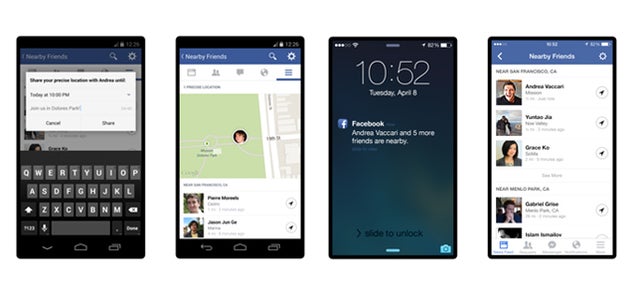
Facebook Adds "Nearby Friends" to Show You Where Everyone's At

Facebook has always encouraged you to share with your friends — your favorite movies, pictures, and life updates. Now Facebook wants you sharing your location, too.


Facebook's newest feature, Nearby Friends, begins rolling out today. The opt-in feature broadcasts your exact location, and can even give real-time updates as you move around, if that's the kind of thing you want to share with your friends.
The new feature is opt-in, meaning you'll need to activate it within the app, should you choose to participate. Users who do not activate Nearby Friends won't be affected in any way, and will not share with or receive any location information from others on the platform.

How to use Nearby Friends

  • To see friends in your area, turn on Nearby Friends in settings within the mobile app. This feature is opt-in, meaning you must manually activate it if you want to be seen (or see others). Once the feature is activated, you'll go through a small tutorial that explains how to use the feature.
  • You can select the groups on Facebook with which you want to share your location. You can't share your location with the public or with friends of friends. You can only share it with friends or other groups that you have created, like "close friends" or "family."
  • Facebook will notify you when friends are nearby, at which point you can message those friends if you want to connect. You won't be able to see a friend's exact location, however. For example, the app may say that a friend is within two miles, but the exact coordinates will not be shared automatically.
  • If you turn on Nearby Friends, it will not turn off automatically. You will continue to broadcast your approximate location until the feature is manually turned off. Users be reminded that they are sharing their location thanks to push notifications, says Vaccari

The new feature is intended to help friends meet offline, says Vaccari, whose startup Glancee was acquired by Facebook back in 2012. Vaccari, who grew up in Italy, was building similar technology at Glancee in order to meet new people, a challenge he faced when he came to the United States. At Facebook, the technology only applies to a user's friends, which Vaccari believes will encourage more people to try it out.

Facebook has been testing the feature with the "vast majority" of the company's 6,500-plus employees for close to 18 months, according to Vaccari. During that time, Facebook used employee feedback to shape the feature and hone the notification algorithm. At the beginning, users received notifications that they had friends nearby all the time, says Vaccari.

Source: mashable,Gizmodo | Image: Gizmodo


How to get Cortana Outside the US

If you live outside the US and are now running the dev preview of Windows Phone 8.1, you may well be weeping at the absence of one of its most important features: Cortana. But weep no longer, because you can get Cortana outside of the US, and it's incredibly easy to set up.

If you go into the settings of your device and change the region to US and then change the interface language to English (United States), you can get access to Cortana right now. Note that you may have to reboot your phone a couple of times but that’s a small inconvenience for getting access to the digital assistant.


As of right now, Cortana is locked to the US but it will be expanding it to the UK and China later this year, with further regions gaining support in 2015.

Source: Neowin

Cortana - personal assistant on Windows Phone 8.1

Cortana
Cortana is the codename for the newly announced intelligent personal assistant and knowledge navigator for Windows Phone 8.1. The technology is expected to be added to Windows 8.x and the Xbox One in the future. It builds off of Microsoft’s current voice technology called TellMe, which was purchased by Microsoft in 2009.

The name ‘Cortana’ comes from the fictional, artificially intelligent (AI) character in the Halo video game series. It was first spotted in June 2013 in the Windows Phone Central forums, appearing as ‘zCortana’ from a developer device that was accidentally sold to a non-Microsoft employee.

Cortana is your personal assistant on Windows Phone 8.1. She’s great for finding nearby sushi joints, reminding you to get milk on your way home and much more. You won’t find Cortana confined to her app though, she’s hanging out in other parts of Windows Phone 8.1. Here’s a quick tip for adding events to your calendar from text messages and emails. Cortana is intelligent enough to understand that your contact wants to do something at a certain time. She’ll then make scheduling that appointment easy and with a few taps it’s in your calendar. She’ll do her best to understand what it is you’re doing with that person, but she’s pretty accurate at understanding the time. You might need to edit the actual activity, but that’s a minor quibble.

Wednesday, 16 April 2014

Download the Windows Phone 8.1 Preview for Developers Download Now

Windows Phone 8.1
It's finally here. After many days of waiting for bits from the BUILD developer conference, Windows Phone enthusiasts can now download the Windows Phone 8.1 Preview for Developers via the 'Phone Update' option in Settings. The Windows Phone 8.1 Preview is essentially the final build of Windows Phone 8.1, but has been dubbed Preview for Developers so Microsoft can bypass any carrier restrictions. Your Wait is over here is the way through you can get an update for Windows phone 8.1. How to get an update for Windows phone users you have to complete couple of steps to get an update


Step1: Register yourself as a developer: for registering as developer go to App Studio page and sign in with your Microsoft account (i.e. Hotmail/live/outlook). This is the place/ site where Microsoft provides you web- interface to build apps.


 Step2: Download the app “Preview for developer”: after registering yourself with your Microsoft account in the app studio page hover over to the Windows Phone Store and search for the app named “Preview for developers” (Size 1MB). Once you downloaded it, open the app on your phone and sign in with your registered email after that tick the “Enable Preview For developers”.

Step3: Check for the updates: Go to the settings>Phone update >check for the Updates . Now you get the first update after completion of the update a new Update will Start Downloading which is the Windows Phone 8.1.

If you miss any of the steps then you may not get this update.

Windows Phone 8.1 includes a whole ton of new features, including a new Action/Notification center, lock screen customization, Start Screen wallpapers, Cortana and more. If you're already registered in the Preview program, head over and update your phone via the 'phone update' option in Settings. Happy previewing!

Source: WinBeta