Xiaomi Mi4c Leaked To Come With Type-C USB port and Even More Internal Storage

It was earlier reported that Xiaomi Mi4c is going to carry a price of less than $250, which is a steal of a deal considering that you will get a smartphone running a Snapdragon 808 chipset in it.

Windows 10 for phones features revealed

Microsoft showed off a number of new features for Windows 10 on phones today, but in afternoon sessions at the company’s press event. Most of the demonstrations focused on improving the built-in apps and features of Windows Phone, and fixing a lot of the oddities. That includes mail, maps, photos, Skype, and messaging.

Windows 8 and Windows 7 would receive a free upgrade to Windows 10

Once the OS launches later this year, Microsoft announced that all users who are using- Windows 8 and Windows 7 would receive a free upgrade to Windows 10 . With the release of the January Technical Preview, Microsoft is testing one of those systems.

Windows 10 build 9926 installation process

If you are installing the Windows 10 build that was released today, you will notice that the installation screens have been slightly changed or updated since Windows 8 and even over 9879, to a small degree. Since we know you don't install Windows builds frequently, we snapped some screens while installing the OS that you can see at the bottom of the post.

Whatsapp launches the Web client

Today WhatsApp announced a web client that will enable users to use the world’s most popular mobile IM client on their PC and Macs. But this web Client works only in the Google Chrome browser.

Showing posts with label News. Show all posts

Friday, 30 October 2015

Xiaomi is celebrating Diwali with flash sales starting at Re 1 and more


Xiaomi has geared up for the Indian festive season and announced Diwali with me that include flash sales, discounts and prizes. The sale will be held on November 3, 4 and 5, just ahead of Diwali.

The new announcement comes via its site and social channels. In addition, Xiaomi India head Manu Jain has tweeted saying the flash sale will start at Re 1.

Earlier this year, as a special promotional offer, the first 1,000 registrants of the Mi Band had received it at Re. 1. So, we can most likely expect the band to go on sale.

The Re 1 flash sale will be held at 2PM and 6PM on all three days. To be eligible for the flash sale, users will have to share the flash sale promotion on mi.com/in via Facebook or Twitter. It will introduce the Light me up game and users playing this game stand a chance to win coupons to make purchases from the Mi store. Users who transact on the Mi store app during the sale period could get lucky to win the bumper prize – a Mi TV 2S.

Rules for Diwali with Mi Promo


₹1 Flash Sale
The Flash Sale will be held on mi.com/in at 2pm and 6pm on November 3-5, 2015.
Users are eligible for the Flash Sale only if the Flash Sale promotion on mi.com/in has been shared by the user on his/her Facebook or Twitter account from 10am 28th Oct to 4pm 5th Nov, 2015.
Sharing channel will be closed 2 hours prior to the Flash Sale. i.e 2pm and 6pm during 3rd-5th November.
Sharing the promotion once via Facebook/Twitter will be sufficient for users to be eligible for all following Flash Sales held between 3rd to 5th November.
All the Flash Sales that are part of the promotion will be ‘masked’ Flash Sales. That is, a user will not know what product he/she is buying under the ₹1 Flash Sale until the item is added to cart. The product the user is buying will be revealed to the user only in the cart.
Warranty services are not applicable for products sold during the flash sale at ₹1

“Light Mi Up” Game
On entering the game page, users will see a pattern being formed in a specific order. Once the pattern disappears, the user has to re-trace this pattern in the same order within the specified time.
If the user succeeds in re-tracing the pattern within the allotted time, he/she gets a chance to win a prize.
Every user gets 5 chances per day to play and win coupons during 28th Oct to 2nd Nov, 2015.
Users also get to challenge their friends by creating their own pattern and sharing them on Facebook/Twitter.
Users who win a Mi phone during the game will be contacted soon to redeem the prize.

Mi Store App Coupons
Users playing the “Light Mi Up” game stand a chance to win coupons from 28th Oct to 2nd Nov, 2015.
Coupons can be redeemed only on purchases made on the Mi Store App between November 3-5, 2015.
Please go to My orders -> Coupons on your Mi account to view your coupons.

Bumper offer
All users who transact on the Mi Store App during November 3-5, 2015 stand a chance to win the bumper prize - the Mi TV 2S.
One lucky winner will be selected every day during this period (November 3-5, 2015), and the winners will be announced on the Mi India official Facebook page.
Winners will be chosen at Xiaomi's sole and absolute discretion. Decisions by Xiaomi are final and binding.
Warranty services are not applicable for products that are given away as prizes during the aforementioned campaign period.

PayUmoney
Users can avail 5% cashback, capped at ₹500, on their purchases from 10am Nov 3rd to midnight Nov 5th, 2015.
Each user can avail the offer only once during the aforementioned campaign period.
The 5% cashback (up to a maximum of ₹500) on PayUmoney is applicable across payment types and will be credited instantly in case the user has a wallet already registered with PayUmoney.
Users who do not have a PayUmoney wallet will receive a phone number verification email. Post verification, the cashback will be credited to their account.
This offer is not available on Mi Store App v1.0.4 and previous versions. Mi Store App users, please update to the latest version (v1.0.5) to avail this offer.
All decisions made as part of the #DiwaliwithMi promotion are at Xiaomi’s sole and absolute discretion and are final and binding.
Besides, the Mi Band and Mi in-ear earphones will also be up for grabs at 10 am on all three days priced at Rs 799 and Rs 299, respectively. Users opting for PayU will get 5 percent cashback. Read the complete rules for the Diwali sale here.


 Source: Mi India 

Friday, 18 September 2015

Xiaomi Mi4c Leaked To Come With Type-C USB port and Even More Internal Storage


It was earlier reported that Xiaomi Mi4c is going to carry a price of less than $250, which is a steal of a deal considering that you will get a smartphone running a Snapdragon 808 chipset in it. However, the rising tech star has another surprise waiting for its loyal army of consumers, which you will find out soon enough.

Xiaomi Mi4c Is Also Going To Come With 64GB Of Internal Storage, according to a source close to the matter, Xiaomi Mi4c is going to be shipped out in both the 16 and 32GB models. The 16GB model is going to be running 2GB of RAM, while the larger storage model is going to come running with 3GB of RAM. However, perhaps the biggest surprise that we have come across is that there is going to be a 64GB internal storage model available for customers. The source has not stated anything regarding the amount of RAM present in this particular version, so we will just stick to our guts and believe that it will come with 3GB RAM as well.


Other specification details include a 5 inch screen with a resolution measuring at 1080p. There is going to be a 3,080mAh battery present and since the chipset running inside Xiaomi Mi4c is Snapdragon 808, an LTE modem is also going to be incorporated in it. Moving on, one critical feature present in the handset is that unlike the remaining Xiaomi smartphone lineup, Mi4c is probably going to be the first to feature a Type-C USB port.


Not only is this particular port able to speed charge the mobile device, but it will also increase data transfer speeds, something that smartphone users desperately needed. With Qualcomm’s Quick Charge 2.0 feature, Xiaomi Mi4c will immediately have its battery level spike up to 60 percent in a matter of 30 minutes. Coming to the pricing details of the upcoming smartphone, the source states that the 32GB model is going to retail for 1,499 Yuan, which makes it equal to $235 USD.
What this means is that 16GB model could be priced at 1,299 Yuan, or $204 USD, while the highest storage model will be slightly more expensive than the 32GB version. Unfortunately, we do not have the pricing details of this model, but if this leak quickly emerged, then you can rest assured that we will also come across the pricing leak shortly.

Source : wccftech | Image Via techgrapple


Tuesday, 28 July 2015

Windows 10: Download ISOs

Most Awaited Windows OS i.e. Windows 10 is officially here, Microsoft has now released the OS to consumers around the world. Most of you will download the OS through Windows Update to obtain your free version of Windows 10, if you need an ISO of the OS, Microsoft has you covered.


Before you begin, Make sure you have:

  • An internet connection (internet service provider fees may apply).
  • Sufficient data storage available on a computer, USB or external drive for the download.
  • A blank USB or DVD (and DVD burner) with at least 4 GB of space if you want to create media. We recommend using a blank USB or blank DVD, because any content on it will be deleted.
  • Read the System Requirements.
  • If you will be installing the operating system for the first time, you will need your Windows product key (xxxxx-xxxxx-xxxxx-xxxxx-xxxxx). For more information about product keys and when they are required, visit the Microsoft FAQ page.
  • For Enterprise editions please visit the Volume Licensing Service Center
Use the media creation tool to download Windows. This tool provides the best download experience for customers running Windows 7, 8.1 and 10. To learn how to use the tool, go to the Installing Windows 10 using the media creation tool page. Tool includes:
  • File formats optimized for download speed.
  • Built in media creation options for USBs and DVDs.
  • Optional conversion to ISO file format.

Download WINDOWS 10

Friday, 24 July 2015

In India these Lumia Devices Can Get 4G LTE support Through Latest Update

Last week, Microsoft rolled out the latest non-preview version of its mobile OS, Windows Phone 8.1 Update 2, to the Lumia 830 in India, alongside a firmware update for a trio of other handsets. The latter was said to include a minor firmware tweak, to add 4G LTE connectivity support to local Indian variants of these devices. Lumia 1520, Lumia 1320, Lumia 1020, Lumia 930, Lumia 925, Lumia 920, Lumia 830, and Lumia 625.


Users of these devices can either install the latest update through the Push Notification or go to Settings > Phone update > Check for Update to manually download it. Then go to Settings > Mobile + SIM to enable 4G.


'The update only adds support for FDD-LTE (1800MHz) due to hardware limitations; future Lumia devices available in India will also include TDD-LTE (2300MHz) support'. WMPU

Source: WMPU via NeoWin 

Thursday, 23 July 2015

WhatsApp Adds Mark As Unread and some other features in its latest Update

In the new update of WhatsApp for the Android , messages can be marked as ‘unread’ by tapping and holding the conversation. They are given a green status, serving as a reminder for users to reply to someone another time.


The messaging service also has a new custom notifications setting, giving users the ability to mute a conversation for eight hours, one week or one year.

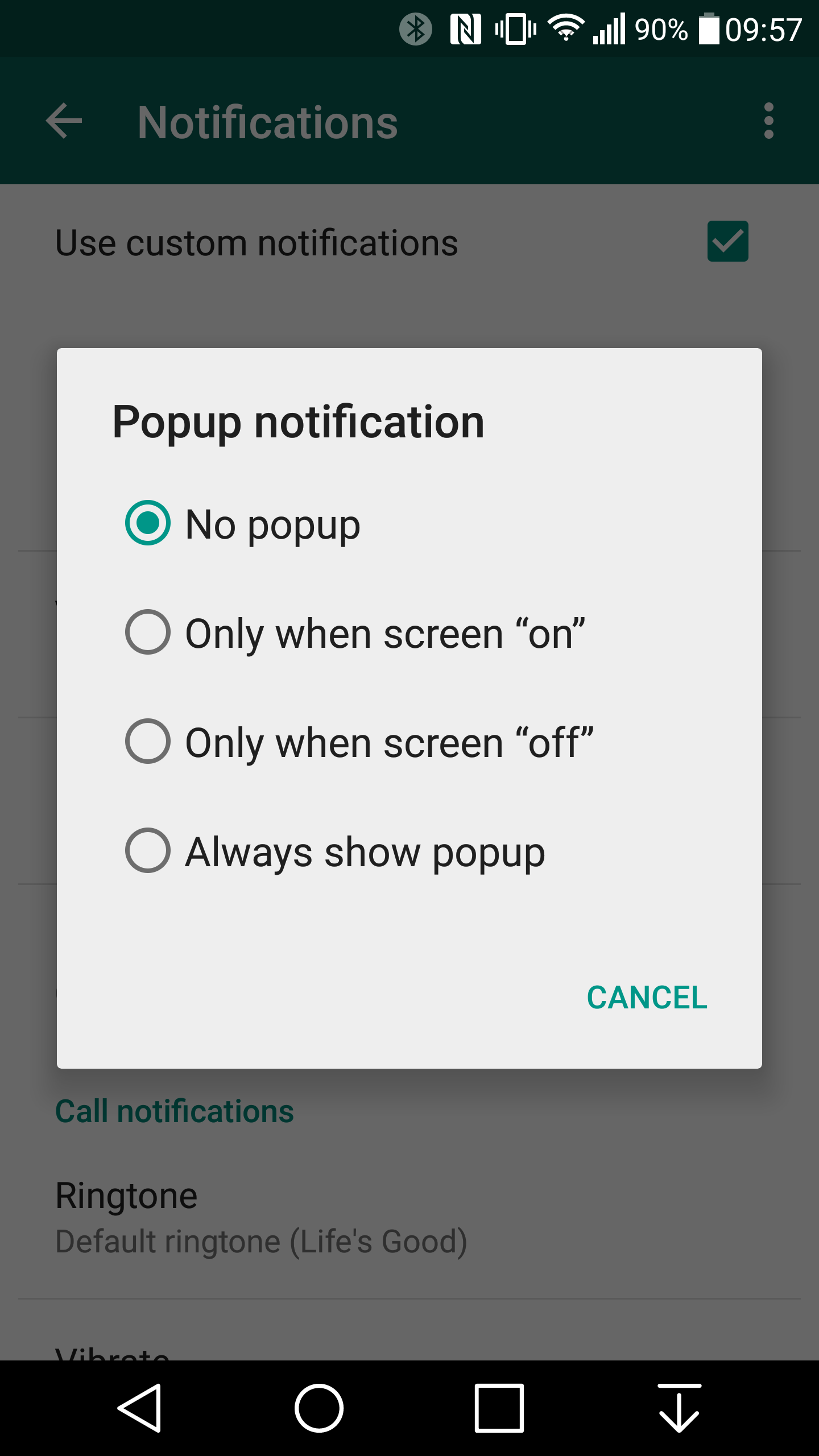
Tones, vibration lengths and pop-up notifications can also be customised.

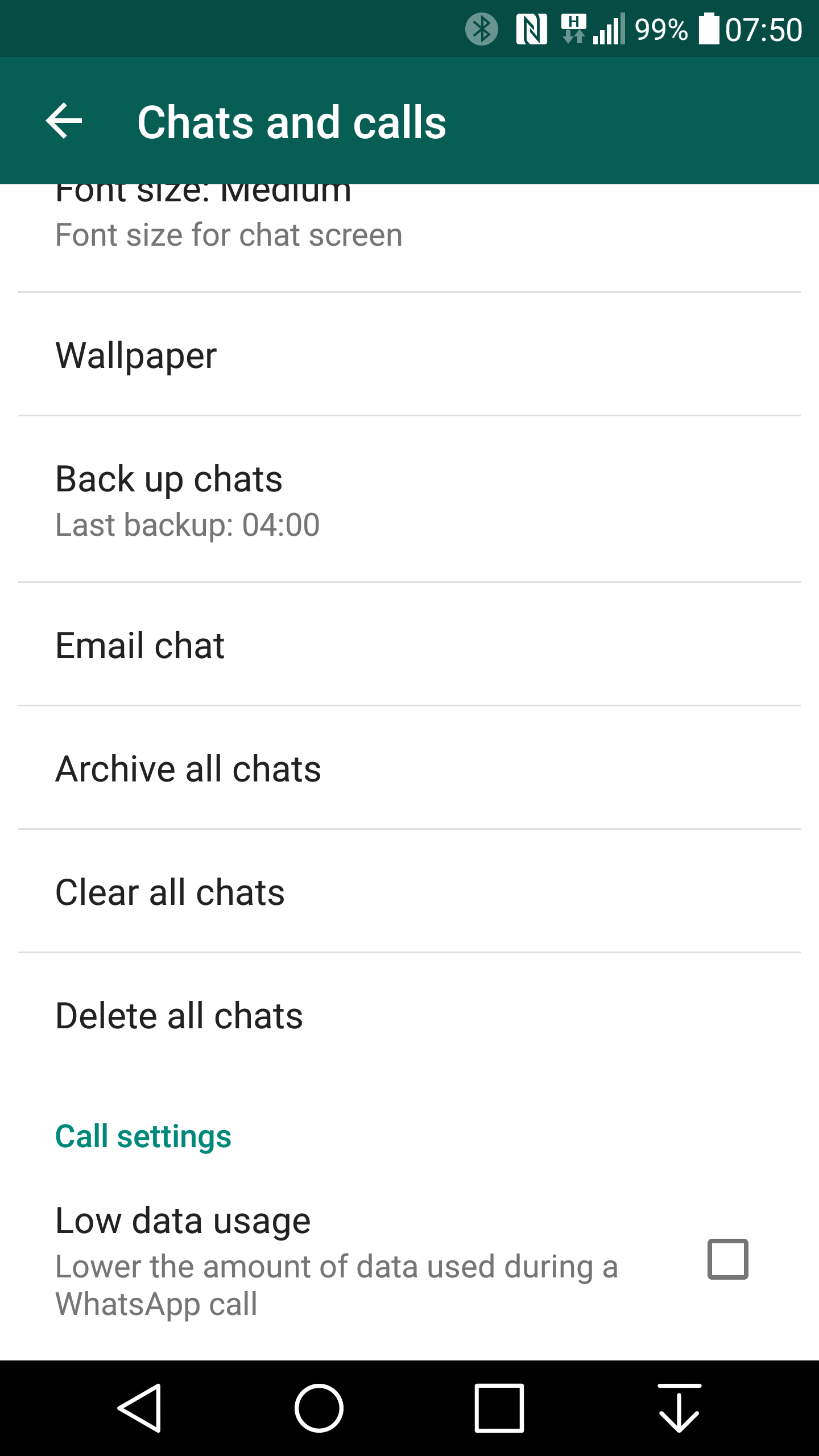
A low data usage option for WhatsApp voice calls has been implemented and the new sections showing Google Drive backup usage suggests that the feature could be returning after it was introduced and deleted earlier this year.

The update can currently only be downloaded manually..

Source: independent | Image via AndroidPolice

Thursday, 25 June 2015

Microsoft has released Windows 10 Mobile build 10149, only for Fast Ring users


Microsoft releases another build of Windows 10 Mobile users and this time, it is build 10149; the download is  only available to Fast Ring users in the Insider program.

The download is available now by going to Settings - > Update and Security -> Phone Update and then having your device look for the new build. This release is only for Fast Ring users.

Microsoft has pointed out that this build still has the missing post-upgrade migration screen, and as such, the lock screen will appear frozen for up to 10 minutes after installing. If you do restart your phone before this process finishes, you will end up in a 'funky state' as Microsoft calls it, so sit back and relax.

As usual, you should only install this on a backup device as these builds have been known to have quite a few issues with them.


Here 's what's new in this release:

  • Microsoft Edge: The first thing you’ll notice in this build is that the Microsoft Edge branding is now included. This build also has the address bar at the bottom – this is a change that Microsoft made based on feedback from Windows Insiders. The option to view websites in mobile view or desktop view is also included in this build as well.
  • IMPORTANT NOTE: The result of the naming switch from “Project Spartan” to Microsoft Edge means that the Microsoft Edge app has a new app ID. This will cause any favorites, cookies, history and reading list items that you had saved in the Project Spartan app to be lost after upgrading from a previous Windows 10 Mobile Insider Preview build.
  • General UX improvements and refinement: You’ll see a lot of UX improvements and refinement in this build. Microsoft has fixed an issue where many Live tiles pinned to Start would appear blurry – so your Start screen looks much more clear and crisp. You’ll also see a lot more refinement of controls with updated icons and visuals (such as the volume controls). Overall, you’ll find the OS more responsive to use.
  • Improvements to Cortana: Cortana’s Notebook is in its final stage with a combined Profile and Settings experience now. You also now set up Quiet Hours in Cortana’s Notebook as well.
  • Flashlight quick action: One of the top pieces of feedback Microsoft heard from Windows Insiders for Action Center in Window 10 Mobile was to add a Flashlight quick action so you can quickly turn your phone’s flash into a flashlight; this feature is now included. Just open Action Center, and expand quick actions to check it out for yourself. You can customize which quick actions are always shown in Action Center without having to expand.
  • Check out the updated Photos app for Windows 10: Microsoft has published an update to the Photos app via the Windows Store Beta. This update includes general performance and reliability improvements, as well as new capabilities such as support for animated GIFs (works on phones with 1GB of RAM or higher). This was a top request from Windows Insiders! And now links to your saved photos, screenshots, and camera roll are available on the Albums page.
  • Automatic camera upload via OneDrive: Automatic camera roll upload is now managed directly with the OneDrive app on your phone. Make sure you open the OneDrive app and go to settings to set camera upload to be turned on or off depending on which you prefer.
  • Update your apps: Make sure you check the Store Beta and download the latest updates for apps. Many of our first party apps such as Outlook Mail and Calendar, Music, Movies & TV, and the MSN apps (News, Weather, Sports, and Money) are updating independently of builds so Microsoft can get changes to you faster. Make sure you have the updated versions of these apps to get the best experience on your phone.
Source :Neowin

Tuesday, 23 June 2015

WhatsApp Update : Windows Phone User now able to make voice call and send audio files


Finally, WhatsApp releases its new update for the Windows Phone users, the time has finally arrived: voice calling is finally here for everyone. After being announced more than a year ago then launching in private beta earlier this year, the calling feature is here after a long and twisting road.

Of course, there's another minor addition in this update as well. Here's the full breakdown of what's new in WhatsApp version 2.12.60:


  • WhatsApp Calling: Call your friends and family using WhatsApp for free, even if they're in another country. WhatsApp calls use your phone's Internet connection rather than your cellular plan's voice minutes. Data charges may apply. Available on Windows Phone 8+.
  • You can now send audio files (available on Windows Phone 8.1+)

And there you have it, the wait is finally over. If you want to get started calling all of your buddies from the warm, green comfort of WhatsApp, you can grab the update from the link below.


Saturday, 20 June 2015

Windows 10 Mobile TP 10136 users may get an update

Those of us who have installed the Windows 10 Mobile Technical Preview Build 10136 can attest that while it looks a lot better than 10080, it is not the most stable operating system.


Now Winuser.ir reports that Microsoft is pushing out an “Insider Fast Configuration” update to some 10136 users meant to address some of the issues.

It present it is not clear what the update fixes, but given the number of bugs in W10M we can only call any update to the OS welcome.

source: wmpoweruser 

Thursday, 18 June 2015

Nokia says the company will return to the smartphone Market in 2016

When Microsoft bought Nokia's Devices and Services division in 2013, there was an agreement made that keeps Nokia from entering the smartphone business until the fourth quarter of 2016. However, it appears that Nokia will indeed be doing just that once that agreement expires.


In a statement to Reuters, Nokia CEO Rajeev Suri noted today that his company will be licensing and designing phones and getting them manufactured and sold through other third-party channels.

""We will look for suitable partners. Microsoft makes mobile phones. We would simply design them and then make the brand name available to license."
This news comes as Microsoft announced earlier this week that it would merge its devices group with its operating system division under the new Windows and Devices Group. Stephen Elop, the former CEO of Nokia, has now left Microsoft as its devices head, along with its phones leader Jo Harlow.

Source: windowscentral

Cortana will be available for Android phones at the end of June

Now-a-days Microsoft focusing on cross-platform approach to software development it wasn't a great surprise, few weeks ago Microsoft confirmed that its Cortana digital assistant would be made available on Android and iOS this year, as a 'companion app' to Windows 10.


On May 26, Microsoft announced that:

The Cortana companion will be available for Android phones at the end of June and for iPhones later this year.
However, in its announcement yesterday that Cortana is heading to the Xbox One, Microsoft briefly referred to its Android plans again - but that planned launch date seems to have slipped:

Starting in July, the beta of the Cortana app for Android Phones will be available to test as a companion to Windows 10 PCs.

It is not clear what has caused Microsoft to push back the launch of the Cortana app on Android from June to July, but it seems a safe bet that the company wanted to give itself a bit more time to fix bugs and make final improvements to the app before releasing its first public beta.

Saturday, 6 June 2015

Leaked : Windows 10 Build 10134 – dark Microsoft Edge, and more!

A new build of Windows 10 has been leaked yesterday with a couple of new things and some tweaks throughout the operating system and this time it is version 10134.

Microsoft added that as going forward, their focus is on squashing bugs and polishing up the OS to get it ready for the July 29th release. Knowing this, it's not a huge surprise that the OS does not have any major new features or updates. In fact, it has fewer changes than what were shown by Gabe Aul with build 10136.

So what’s new in this 10134?

1. Microsoft Edge gets a dark theme


There are a couple of new customization features already available on Windows 10, and there are some hidden ones – such as the ability to enable a dark theme for the OS. Enabling the dark theme via Registry Editor enables a dark theme for most elements of the OS, such as the Clock dialog, Settings app, etc. Unfortunately though, not all of the applications have a dark theme yet – at least on the latest, official Windows 10 Build.

 Microsoft has added a dark theme for Microsoft Edge on Build 10134, which you can enable using a registry hack. If  you want to enable Microsoft Edge’s dark theme on Build 10134, just follow the steps below:

  • Open Registry Editor (regedit.exe)
  • Navigate to HKEY_CURRENT_USER\SOFTWARE\Microsoft\Windows\CurrentVersion\Themes\Personalize
  • Create a new DWORD value and name it “AppsUseLightTheme”
  • Set the value of the DWORD value to “0”
  • Restart File Explorer, and you should now have the dark theme.
(We got this Tip from @gus33000 via wmpoweruser)

2. Snipping Tool picks up an update

On Build 10134, Microsoft has updated its Snipping Tool also and it packs a much-needed feature. On Build 10134, users can delay the snipping tool which is indeed a really nice addition. Take a look at the screenshots below to see what else is new on Snipping tool:


As expected, there aren’t many new things on Build 10134. However, there are some new options for Windows Updates on Build 10134. There’s a new option on Windows Update which lets you “try new features” – which is presumably for Insiders to get new (under-development) features after Windows 10 gets released to the public.

Source: wmpoweruser

Saturday, 16 May 2015

Microsoft shares What happen if you upgrade a non-genuine Windows to Windows 10


Many users have a same confusion about what happens if they upgrade a non-genuine version of Windows to Windows 10. Today according to  Terry Myerson 's post, if you are using a non-genuine version of Windows and you want to upgrade to Windows 10 then, there will be a watermark placed on your desktop. Microsoft has not yet shown the non-genuine watermark in Windows 10. However, in other versions of Windows, it appears in the bottom right corner and says "This is not a genuine copy of Windows". If you buy a Windows machine that displays this message, you should return it.

He also added in his post that  the Microsoft will be offering “attractive” Windows 10 offers to non-genuine Windows users.

One area Microsoft has not yet clarified is if you are part of the Insider program and upgraded a non-genuine build to the new OS, if you will still see this watermark.

Source: Microsoft via NEOWIN

Thursday, 14 May 2015

Windows Phone 8.0 devices won't be able to be unlocked for development purposes anymore

If you are a Windows Phone app developer and want to continue testing your apps on Windows Phone 8.0, you might want to take heed of an email Microsoft is sending to app developers today. After 7 p.m. Pacific time today, Windows Phone 8.0 devices won't be able to be unlocked for development purposes anymore.


Here's the text of what Microsoft is sending to app developers:

The Windows Phone 8.0 certificate that validates developer unlocks will expire today May 13, 7pm, Pacific Daylight time. We recommend that you re-unlock your Windows Phone 8.0 test devices prior to today 7pm, to continue testing for another 24 months.
After today, no Windows Phone 8.0 device will be able to be developer unlocked, and you will have three options to continue testing Windows Phone 8.0 packages: – Update the phone to Windows Phone 8.1 and unlock it for developer testing – Submit apps as beta through the Windows Dev Center and test with Windows Phone 8.0 devices – Test Windows Phone 8.0 apps via the Windows Phone emulator
Any Windows Phone 8.0 device currently unlocked will continue to be unlocked and work as a test device until its certificate expires. To maximize the time available to test with this device, please lock then unlock the device before May 13, 2015 7pm PDT.
Note that this change has no impact on apps available in the Windows Phone Store, has no impact on Windows Phone 8.1 devices, nor will it impact customers with Windows Phone 8.x devices.
This shows that Microsoft is making developers distance themselves from making apps that support the older Windows Phone 8.0 in favor of the current Windows Phone 8.1 OS. Microsoft has already announced that all Windows 10 devices will have access to a "developer unlock" mode in its settings.

Source : windowscentral 

Monday, 27 April 2015

Microsoft has now rebrand more than fifty Nokia stores location at Brazil


The company announced yesterday that all more 50 locations in Brazil will be re-branded as part of a larger push to have more than 100 points of sale in the country by the end of 2016.

By Microsoft 

Microsoft also confirms that it will kick off its rebranding efforts with the Microsoft Store at the Eldorado Mall in Sao Paulo on April 29. To celebrate the launch, the first 100 customers to buy a Lumia smartphone at the location will receive a "special gift " . The gift to be give is not yet discussed .

It's important to stress that these locations don't seem to be full-blown Microsoft Stores, with Microsoft noting that the shops and kiosks will use a "franchise model" throughout the country. Still, it's a good sign that the Microsoft name will be gaining a larger footprint in an important market.

Saturday, 18 April 2015

Wearable device transforms your thumb into a tiny trackpad


Researchers at the Massachusetts Institute of Technology (MIT) are developing a new wearable device that turns the user’s thumbnail into a miniature wireless track pad.
They envision that the technology could let users control wireless devices when their hands are full – answering the phone call while cooking, for instance.
“It’s very unobtrusive. When I put this on, it becomes part of my body. I have the power to take it off, so it still gives you control over it. But it allows this very close connection to your body,” said lead author Cindy Hsin-Liu Kao, a graduate student at the MIT.
The device could enable subtle communication in circumstances that require it, such as sending a quick text to a child while attending an important meeting.
According to Kao, the device was inspired by the colourful stickers that some women apply to their nails.
The researchers envision that a commercial version of their device would have a detachable membrane on its surface, so that users could coordinate surface patterns with their clothes.
And it’s easily accessed by the other fingers – even when the user is holding something in his or her hand.
For their initial prototype, the researchers built their sensors by printing copper electrodes on sheets of flexible polyester.
The researchers said requiring surface contact with the operator’s finger for just two or three seconds was enough to guard against inadvertent activation and deactivation.
A paper describing a prototype of the device is scheduled to be presented at the Computer-Human Interaction conference in Seoul, South Korea this week.


Saturday, 14 March 2015

Again Windows 10 Build 10036 Leaks


It has been a few months since we have had a proper build of Windows 10 leak but that changes today as build 10036 has been posted on the web. So far, we’ve seen a handful of leaked screenshots and some videos over the last few weeks of the upcoming Windows 10 build. However, OSBetaArchives has just leaked the upcoming Windows 10 build, build 10036.

Build 10036 doesn’t come with Microsoft’s latest browser, Spartan. The build includes new UI improvements, transparent Start Screen, improved network settings and much more. We don’t recommend installing the leaked build – however, if you want to take the risk, you can download it from here. It’s worth mentioning that the leak is available in two variants: Enterprise and Pro as well.

Microsoft or the Windows team hasn’t yet revealed any official launch date for the upcoming build. However, we expect the company to release a new build to Windows Insiders later next week.

Source: wmpu

Thursday, 12 March 2015

WhatsApp rolls out the Voice Call feature only for Android Users -- how you enable this feature


Previous year WhatsApp announced their plan to add a voice calling feature to its instant messaging app i.e. WhatsApp. The feature was rolling out to users on an invite basis. But the company is finally easing up on that as now it is allowing anyone to get the call feature provided they have an Android phone with the v2.11.561 installed on it, and a friend with the feature willing for you to call them. BetaNews is able to report and confirm that the aforementioned trick is working worldwide.

In Marketplace, there is a bunch of apps which already have the internet voice calling features such as Viber, Hangouts (it charges for international calls), Skype, and even Facebook’s Messenger, WhatsApp isn't the first one to get this. But what makes WhatsApp different over competing apps is the voluminous amount of users it has attracted since its launch in 2009.

While the internet voice calling feature doesn't appear as enticing -- or at least new -- in developed nations, it is evidently a major hit in the developing world such as India, where it has entrenched itself as a front runner in the competition. Furthermore, internet voice calling also allows people in the emerging market to significantly reduce their mobile tariff.

To use this feature, users are required to download the v2.11.561 app on their Android smartphone or tablet (users can install it on a tablet by sideloading the installation file), and ask their friends -- who already have the feature -- to call them up. As soon as the call is over, users will observe visual changes in the user interface of the app as well as an improved call button. At the time of writing, the feature wasn't active on WhatsApp’s Windows Phone and iPhone apps.

Source : BetaNews | Image via Manish Singh

Sunday, 8 March 2015

Gallery: On Windows 10 build 10031 Floodgates are opened


Wzor has now truly opened the floodgates on 10031 bearing all but a physical leak of the x86 variant of build 10031 in a blog post, updated earlier today.

These past few days have shown us a new login screen, Spartan in action, and included in the build unfortunately (for many) the crappy 'new' Recycle Bin is also still there. Many will hope it doesn't make it into the RTM which is expected to roll out by June.

All of the images are from a Russian Windows 10 build, so some aren't too clear as to what we're seeing regarding Settings menus, but it does give us an idea what to expect soon.

All that remains is for Microsoft to deliver on their promise of a faster cycle of build releases for Insiders, which should mean we will get to play around with a new build sometime in the coming week.

Here is screen shot gallary


Source :  WZor.net via Neowin | Image via Neowin

Tuesday, 24 February 2015

Lock your Folder without using any Software


Everyone wants to hide some of their folders or files which are private. And to lock your folder you need to install a software, and that occupies some space on your hard disk. Today I am going to give you a simple trick to lock your folders or file manually without using any software.


  • Paste the code given below in notepad and ‘Save’ it as batch file (with extension ‘.bat‘).
  • Any name will do.
  • Then you see a batch file. Double click on this batch file to create a folder locker.
  • New folder named ‘Locker‘ would be formed at the same location.
  • Now bring all the files you want to hide in the ‘Locker’ folder. Double click on the batch file to lock
  • the folder namely ‘Locker‘.
  • If you want to unlock your files,double click the batch file again and you would be prompted for
  • password.
  • Enter the password and enjoy access to the folder.

Code

if EXIST "Control Panel.{21EC2020-3AEA-1069-A2DD-08002B30309D}"
goto UNLOCK
if NOT EXIST Locker goto MDLOCKER
:CONFIRM
echo Are you sure u want to Lock the folder(Y/N)
set/p "cho=>"
if %cho%==Y goto LOCK
if %cho%==y goto LOCK
if %cho%==n goto END
if %cho%==N goto END
echo Invalid choice.
goto CONFIRM
:LOCK
ren Locker "Control Panel.{21EC2020-3AEA-1069-A2DD-08002B30309D}"
attrib +h +s "Control Panel.{21EC2020-3AEA-1069-
A2DD-08002B30309D}"
echo Folder locked
goto End
:UNLOCK
echo Enter password to Unlock folder
set/p "pass=>"
if NOT %pass%==type your password here goto FAIL
attrib -h -s "Control Panel.{21EC2020-3AEA-1069-
A2DD-08002B30309D}"
ren "Control Panel.{21EC2020-3AEA-1069-A2DD-08002B30309D}" Locker
echo Folder Unlocked successfully
goto End
:FAIL
echo Invalid password
goto end
:MDLOCKER
md Locker
echo Locker created successfully
goto End
:End

Enjoy !!!

Policy update: Google ban sexually explicit content and nudity on Blogger


Today Google warns all the blog users that if there Blogs contains images and video that are sexually explicit or show graphic nudity on the Blogger platform will be offline by Google end of next month.

Google warns existing bloggers with sexual content or nudity that they will have to either remove the content, set their blog to private and only viewable by the owner, or just leave. But, Google said it will allow nudity if the content offers a "substantial public benefit", which includes nudity in "artistic, educational, documentary, or scientific contexts".

According to the Adult content policy on Blogger :

Changes you’ll see to your existing blogs
If your existing blog doesn’t have any sexually explicit or graphic nude images or video on it, you won’t notice any changes.
If your existing blog does have sexually explicit or graphic nude images or video, your blog will be made private after March 23, 2015. No content will be deleted, but private content can only be seen by the owner or admins of the blog and the people who the owner has shared the blog with.
Settings you can update for existing blogs
If your blog was created before March 23, 2015, and contains content that violates our new policy, you have a few options for changing your blog before the new policy starts:
Remove sexually explicit or graphic nude images or video from your blog
Mark your blog as private
If you’d rather take your blog down altogether, you can export your blog as a .xml file or archive your blog's text and images using Google Takeout.
In its content policy for Blogger, Google says "It is our belief that censoring this content is contrary to a service that bases itself on freedom of expression."

Blogs will have until March 23rd to meet the new policy.

Source: Blogger