Xiaomi Mi4c Leaked To Come With Type-C USB port and Even More Internal Storage

It was earlier reported that Xiaomi Mi4c is going to carry a price of less than $250, which is a steal of a deal considering that you will get a smartphone running a Snapdragon 808 chipset in it.

Windows 10 for phones features revealed

Microsoft showed off a number of new features for Windows 10 on phones today, but in afternoon sessions at the company’s press event. Most of the demonstrations focused on improving the built-in apps and features of Windows Phone, and fixing a lot of the oddities. That includes mail, maps, photos, Skype, and messaging.

Windows 8 and Windows 7 would receive a free upgrade to Windows 10

Once the OS launches later this year, Microsoft announced that all users who are using- Windows 8 and Windows 7 would receive a free upgrade to Windows 10 . With the release of the January Technical Preview, Microsoft is testing one of those systems.

Windows 10 build 9926 installation process

If you are installing the Windows 10 build that was released today, you will notice that the installation screens have been slightly changed or updated since Windows 8 and even over 9879, to a small degree. Since we know you don't install Windows builds frequently, we snapped some screens while installing the OS that you can see at the bottom of the post.

Whatsapp launches the Web client

Today WhatsApp announced a web client that will enable users to use the world’s most popular mobile IM client on their PC and Macs. But this web Client works only in the Google Chrome browser.

Wednesday, 30 April 2014

Microsoft's first video editing app - Movie Moments for Windows Phone 8.1

Along with some other apps Microsoft also released their “Movie Moments” app for Windows Phone 8.1 today.The Movie Moments app is basically a simple video editing app, that allows you to put together a sharing-friendly 60 second video clip. The Windows Phone 8.1 version is similar to the Windows 8.1 version, and has features such as trimming, captions, background music, and the ability to share to Facebook, OneDrive, email and more.

Here are those features you can look forward too:
"Turn any video into a memorable moment you’ll love to share. With this app, you can trim your video to your favorite parts, highlight key moments with captions and effects, and set the mood with music.

• Pick your favorite 60 seconds. You can trim from the beginning, middle, or end.

• Highlight your favorite moments with fun, colorful captions in a range of styles.

• Add music that matches the moment. We’ve included a few songs for different moods, or you can use songs from your collection.

• When your movie is exactly how you want it, share it with family and friends right from the app." UTP.


Download Movie Moments for Windows Phone 8.1 from the Windows Phone Store.

Download Movie Moments from Store
Source: UTP | Windows Phone Blog


Lumia Updates Ringtone Maker, Network+, Touch And More Apps In Store

Today Nokia Releases updates for the number of apps in  Windows Phone Store. All these Updates are minor updates so it does not bring any new features. Since it is a minor updates so in this updates contain few bugs fixes.


The following apps got updated,
Network+  – v2.1.2.3,
Touch – v2.3.0.7, 
Nokia Ringtone Maker – v1.3.1.6,
Nokia Care – v3.1.1.10, 
Nokia Treasure Tag – v2014.430.712.5527

How to Remove Virus Through Command Prompt

Virus could be a malicious program that may copy itself and infect your pc. These viruseswill unfold via USB/flash drive or from one pc to different pc by few written codes. There area unit several antivirus software system out there to get rid of viruses from pc. However there area unit some viruses or suspicious files that can’t be removed by any antivirus software system. Some suspicious files like autorun.inf initiate all the viruses in computer. These files should be removed for safe operation of your computer, as a result of they will cause knowledge loss, software system damages etc. Such viruses and files is removed by victimization cmd. during this article we’ll discuss a way to take away a plague victimization electronic communication.
Following steps is wont to take away a plague victimization electronic communication from your pc. Go to begin menu and kind “cmd” within the search box or Start>all programs>accessories>command prompt.
Open the infected drive like write , g: to travel to G drive.
Now kind dir/w/a . it’ll show all the files of the drive as well as hidden files.
Locate AUTORUN.INF or any Virus and different suspicious files within the directory.there was no virus in my drive thus solely autorun.inf is been highlighted.
Type command attrib -r –a –s –h to get rid of attributes of corresponding file.
Type del autorun.inf to delete autorun.inf file.
Now kind del virus name.exe t delete it, eg : del newfolder.exe . (You may delete viruses by victimization following steps: When you notice AN Autorun.inf file or the other uncommon .exe file simply rename it. Syntax for rename is (rename computer filename.extension new name , for example: (rename autorun.inf virus) to rename autorun.inf file.
Here I even have renamed it by “virus”. Now you’ll be able to access the defected drive while not touching the virus. To delete the renamed file move to the defected drive and choose the file you renamed. Now delete the harmful renamed files.) You have deleted that virus with success however typically virus resides within the Recycler folder.To find this folder: Type cd recycler command. Again kind dir/w/a to find all file of the folder. Identify malicious files and delete them victimization on top of commands.Again kind dir/w/a to find all file of the folder. Identify malicious files and delete them victimization on top of commands. Follow the on top of steps rigorously and that i suppose this data is enough to get rid of a plaguevictimization electronic communication simply. Important: ensure that no different processes being running whereas activity these actions. better of luck.

Now print Word documents, Excel spreadsheets and PowerPoint presentations from your iPad

Office Blogs announced on Tuesday that user can able to print there word documents, excel spreadsheets, and PowerPoint presentation from there iPad. This feature is requested by most of the users, This new feature comes with the first update of Office for iPad apps, released last month.

Now in Word for iPad, you can able to choose to print a document with or without markup and in Excel you can print the selected range , a single worksheet or an entire spreadsheet.

This Update also include SmartGuides in PowerPoint and auto fit in Excel.
SmartGuides in Powerpoint helps the users to align pictures, shapes, and text boxes as they move them around the slide and auto fit in Excel allows the users to adjust the width of multiple rows or the height of multiple columns at the same time.


Image Source : Technet

Monday, 28 April 2014

Hide Files or Folders Using Command Prompt


Hiding the most wanted files and folders is very important nowadays and it's really a tedious job too. In order to make this tedious job an easy one, i'm going to deliver you a the trick now. Trick to hide files and folders using Command Prompt not by using any software. The most important thing is that, once hidden with this method, the files/folders cannot be viewed by any search options even if you click "Show All Hidden Files and Folders".
 For Example: You have a folder named "collegephotos" and this folder is stored in (Disk Drive E). You think that it should not be seen by strangers who use your PC.

  For that you need to follow the following instructions
 1.Presswindowkey+R: Run command dialog box appears.
 2.Now type "cmd" and hit enter. A command prompt window displays.
 3.Now type "attrib +s +h E:\collegephotos" and hit enter.
 4.The folder "collegephotos" will be hidden (Note: It cannot be viewed by any search options)


(To view this folder again, use the same command but replace '+' with '-' on both flags 's' and 'h').

Sunday, 27 April 2014

MailTrack – the Whatsapp double-check (✓✓) to track your Gmail

It happens with us that we send many mails and don’t have a facility to track it. Whether its been read or not. We normally get this facility with Microsoft OutLook (read receipt) but it is not available with the web based mail services like Gmail.

So today I’ll tell you how to track mails sent through Gmail and get the Whatsapp like double-check notification. MailTrack is a service that works only with Gmail and Chrome using an Chrome extension, which helps you in monitoring whether the person has opened the email you sent. It uses the traditional system of ticks or Whatsapp like double-check to indicate the status of the mail.

How does MailTrack alert me that my emails have been read?

You only see the ✓ when your email is opened for the first time, but MailTrack can do more. If you hover your mouse over the double-checks, you will also see the history of all the days and hours that your recipients have opened your messages, as well as which device is being used (PC, iPhone, etc).
The MailTrack Chrome extension is free and ensures complete privacy of our information and messages. You can find more information and answer  to your questions on the web site about this utility. It only remains for you to try this interesting tool and share with us your views on it.

Thursday, 17 April 2014

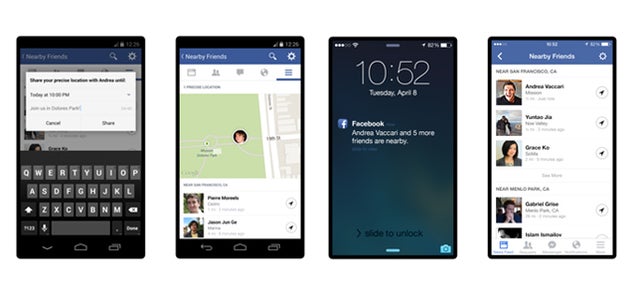
Facebook Adds "Nearby Friends" to Show You Where Everyone's At

Facebook has always encouraged you to share with your friends — your favorite movies, pictures, and life updates. Now Facebook wants you sharing your location, too.


Facebook's newest feature, Nearby Friends, begins rolling out today. The opt-in feature broadcasts your exact location, and can even give real-time updates as you move around, if that's the kind of thing you want to share with your friends.
The new feature is opt-in, meaning you'll need to activate it within the app, should you choose to participate. Users who do not activate Nearby Friends won't be affected in any way, and will not share with or receive any location information from others on the platform.

How to use Nearby Friends

  • To see friends in your area, turn on Nearby Friends in settings within the mobile app. This feature is opt-in, meaning you must manually activate it if you want to be seen (or see others). Once the feature is activated, you'll go through a small tutorial that explains how to use the feature.
  • You can select the groups on Facebook with which you want to share your location. You can't share your location with the public or with friends of friends. You can only share it with friends or other groups that you have created, like "close friends" or "family."
  • Facebook will notify you when friends are nearby, at which point you can message those friends if you want to connect. You won't be able to see a friend's exact location, however. For example, the app may say that a friend is within two miles, but the exact coordinates will not be shared automatically.
  • If you turn on Nearby Friends, it will not turn off automatically. You will continue to broadcast your approximate location until the feature is manually turned off. Users be reminded that they are sharing their location thanks to push notifications, says Vaccari

The new feature is intended to help friends meet offline, says Vaccari, whose startup Glancee was acquired by Facebook back in 2012. Vaccari, who grew up in Italy, was building similar technology at Glancee in order to meet new people, a challenge he faced when he came to the United States. At Facebook, the technology only applies to a user's friends, which Vaccari believes will encourage more people to try it out.

Facebook has been testing the feature with the "vast majority" of the company's 6,500-plus employees for close to 18 months, according to Vaccari. During that time, Facebook used employee feedback to shape the feature and hone the notification algorithm. At the beginning, users received notifications that they had friends nearby all the time, says Vaccari.

Source: mashable,Gizmodo | Image: Gizmodo


How to get Cortana Outside the US

If you live outside the US and are now running the dev preview of Windows Phone 8.1, you may well be weeping at the absence of one of its most important features: Cortana. But weep no longer, because you can get Cortana outside of the US, and it's incredibly easy to set up.

If you go into the settings of your device and change the region to US and then change the interface language to English (United States), you can get access to Cortana right now. Note that you may have to reboot your phone a couple of times but that’s a small inconvenience for getting access to the digital assistant.


As of right now, Cortana is locked to the US but it will be expanding it to the UK and China later this year, with further regions gaining support in 2015.

Source: Neowin

Cortana - personal assistant on Windows Phone 8.1

Cortana
Cortana is the codename for the newly announced intelligent personal assistant and knowledge navigator for Windows Phone 8.1. The technology is expected to be added to Windows 8.x and the Xbox One in the future. It builds off of Microsoft’s current voice technology called TellMe, which was purchased by Microsoft in 2009.

The name ‘Cortana’ comes from the fictional, artificially intelligent (AI) character in the Halo video game series. It was first spotted in June 2013 in the Windows Phone Central forums, appearing as ‘zCortana’ from a developer device that was accidentally sold to a non-Microsoft employee.

Cortana is your personal assistant on Windows Phone 8.1. She’s great for finding nearby sushi joints, reminding you to get milk on your way home and much more. You won’t find Cortana confined to her app though, she’s hanging out in other parts of Windows Phone 8.1. Here’s a quick tip for adding events to your calendar from text messages and emails. Cortana is intelligent enough to understand that your contact wants to do something at a certain time. She’ll then make scheduling that appointment easy and with a few taps it’s in your calendar. She’ll do her best to understand what it is you’re doing with that person, but she’s pretty accurate at understanding the time. You might need to edit the actual activity, but that’s a minor quibble.

Wednesday, 16 April 2014

Download the Windows Phone 8.1 Preview for Developers Download Now

Windows Phone 8.1
It's finally here. After many days of waiting for bits from the BUILD developer conference, Windows Phone enthusiasts can now download the Windows Phone 8.1 Preview for Developers via the 'Phone Update' option in Settings. The Windows Phone 8.1 Preview is essentially the final build of Windows Phone 8.1, but has been dubbed Preview for Developers so Microsoft can bypass any carrier restrictions. Your Wait is over here is the way through you can get an update for Windows phone 8.1. How to get an update for Windows phone users you have to complete couple of steps to get an update


Step1: Register yourself as a developer: for registering as developer go to App Studio page and sign in with your Microsoft account (i.e. Hotmail/live/outlook). This is the place/ site where Microsoft provides you web- interface to build apps.


 Step2: Download the app “Preview for developer”: after registering yourself with your Microsoft account in the app studio page hover over to the Windows Phone Store and search for the app named “Preview for developers” (Size 1MB). Once you downloaded it, open the app on your phone and sign in with your registered email after that tick the “Enable Preview For developers”.

Step3: Check for the updates: Go to the settings>Phone update >check for the Updates . Now you get the first update after completion of the update a new Update will Start Downloading which is the Windows Phone 8.1.

If you miss any of the steps then you may not get this update.

Windows Phone 8.1 includes a whole ton of new features, including a new Action/Notification center, lock screen customization, Start Screen wallpapers, Cortana and more. If you're already registered in the Preview program, head over and update your phone via the 'phone update' option in Settings. Happy previewing!

Source: WinBeta

Sunday, 23 February 2014

Facebook messenger is coming for the Windows Phone within a week, news confirmed by Microsoft

Today at the Mobile World Congress Microsoft confirms that they will bringing the Facebook Messenger for the Windows Phone OS. According to Microsoft's Windows Phone leader Joe Belfiore, the release of the app could be just "weeks" away. He added, "We’ve been working with Facebook testing out their implementation for a while. It’s looking good and we will have it for our customers soon." TechCrunch report.

"Belfiore, the Windows Phone VP, argued that 2013 was a very good year for Microsoft’s mobile ecosystem, noting particularly growth in handset shipments in markets such as the U.K. and Italy, and also talking how the number of apps continues to grow — mentioning the arrive of big name apps like Vine and Waze — which he said has helped to improve the overall platform experience for users". Techcrunch reports.

Microsoft has been developing the official Facebook app for Windows Phone, using their own team. Few months before, Microsoft confirms that there are now 200,000 apps are available in the Windows store. In today's press conference, Belfiore said that the total number of app downloads from the store has exceeded 4 billion. He added that "more compelling demanded user apps" for the OS will be announced in the near future.

Source: techcrunch, Neowin | Image by techcrunch

Nokia Lumia 520 also gets an Windows 8.1 Update

Today Microsoft confirmed that the upcoming Windows Phone 8.1 update will come to all existing Windows Phone 8 devices.  The all new Windows Phone 8.1 update is coming even for the most low-end Windows Phone 8 device available in the market i.e Nokia Lumia 520, and the Windows Phone 8.1 of-course runs on the Lumia 520 without any issues.If you have any doubt about it, watch the video about showing Windows Phone 8.1 running on Nokia Lumia 520 device.


This video also revealed that three column live tiles is coming to existing low-end WP8 devices too.

Source: WMPoweruser

Rumor: Nokia is Working on 3 Android Phones

Nokia is working on more than one Android phones, this News revel from the Chinese Website tech.qq.com. Internal emails that were leaked from the Silicon Valley company Artesyn Technologies, suggest that Nokia may be working on more Android smartphones apart from Nokia X, reports the Chinese Technology Website.

The rumor states that besides the Nokia X, there will be a mid range phones and also a high end phones, all are running the Android.

Nokia X is the only phone which is expected to be announced at Mobile World Congress 2014, and the other Nokia phones which are powered by the Android may be announced at  May or June 2014.

When at Mobile World Congress Joe Belfiore was asked about there feelings regarding Nokia Android Work, He says that :
“We have a great relationship with Nokia. They’ve built great products. We haven’t complete our acquisition. They may do some things we’re excited about. Other things we are LESS excited. But whatever they do we are very supportive of the partnership.”

Source: WMPoweruser

Microsoft confirmed that they will slash the price of Windows 8.1 for the low end devices up to 70%

Few days before Microsoft states that they will be slashing the price of Windows 8.1for the low end devices upto 70%. This cut will lower the price of $50 per devices to $15 only for those devices whose price is under  $250 which will be noticeable improvement for the vendors and consumers, according to the bprevious report.

While Microsoft did not come forward and say “We slashed prices by 70%” the company’s Joe Belfiore posted up on the Windows blog that “We’ll enable our partners to build lower cost hardware for a great Windows experience at highly competitive price points.” This clearly aligns to the previous report of the prices being cut on lower-end devices.

The cut in price will help to accomplish several goals. First, it will help OEMs shave more dollars off their products and that will help them to lower to price of consumer products. Second, it should help to move more Windows 8.1 licenses, and while it will help Microsoft’s bottom line, albeit to a lesser degree, it should help Microsoft gain more market share with it’s latest version of Windows. Finally, it will help Microsoft compete against ChromeOS products that are pushing hard on the floor to lower prices for entry-level products.

Sources: NeoWin, Microsoft

Saturday, 22 February 2014

Touch and extra+info of Windows phone 8 receives an minor update

Today the Nokia Lumia gets an minor update for touch and the extras+info. Nokia never fails to impress us with the little options and configurations the company adds with its system app updates.


This Touch update will bring a new setting for users to toggle, which affects the vibration feedback caused by hitting the capacitive Windows key. You are now able to simply turn the vibration ON or OFF. This setting will affect all three Buttons- Back, Windows and Search. The latest version of touch is version 2.2.0.1.
The extras+info also get an version Update from the application version v3.4.3.5 to the v3.6.2.3.

Scan and get the update


Source: WPCENTRAL


OneNote for Windows 8.1 gets an update and adds Support for OneDrive

Today Microsoft has released the Updated version of the OneNote Windows 8.1 app, after the long duration of four months, and adds the supports for OneDrive in this new version. As every one knows that Microsoft rebranded the SkyDrive to One Drive. "Together, OneNote and OneDrive enable you to access your notes on all your devices."

This new OneNote update includes many new features and some improvement. First is it adds the supports for the OneDrive and the second one is it increases the Rule line heights for those users who have bigger handwriting profiles. " To enable Rule Lines, bring up the page app bar (right-click the page, or swipe from the top or bottom of the screen), then select Paper.  Now you can choose between Rule Lines or Grid Lines.",office news.
Another new feature is Go to Note's Location through which you can eaisly able to move to a note's location from recent Notes. "To do this, bring up the page preview app bar (right-click the page preview or swipe up), then select Go to Note’s Location.", Office News.  

Now it’s easier to navigate OneNote with a keyboard and to use Narrator to read your notes. And in this update a variety of bugs were fixed related to the Share Charm along with changes to the backend so it uses less hard drive space.

Finally, 62 new languages are added by OneNote for Windows 8.1. Microsoft says that "with this update, the app now supports 105 languages".

Source: Microsoft | Images by Microsoft

Friday, 21 February 2014

Microsoft is ending the supports for Windows XP from 8 April 2014

Since from the last 12 years Microsoft has provided the support for the Windows XP. In order to steer users away from that 12 years old Operating System, Microsoft is not going to provide the latest security suit for the Windows XP users.

On Friday Microsoft rolled out  a pre-release build of Security Essentials which can’t be installed on a computer running Windows XP. The new security essential is is only compatible with the Windows Vista and higher version of Windows.  Microsoft has provided a link to the previous stable version of Security Essentials and advises Windows XP users to get that version instead.

"As a result, after April 8, 2014, technical assistance for Windows XP will no longer be available, including automatic updates that help protect your PC. Microsoft will also stop providing Microsoft Security Essentials for download on Windows XP on this date, (If you already have Microsoft Security Essentials installed, you will continue to receive antimalware signature updates for a limited time, but this does not mean that your PC will be secure because Microsoft will no longer be providing security updates to help protect your PC.)” Microsoft news.


There are still many schools, Banks and also some Government offices, etc. who were still using the Windows XP. If the user will continue using the Windows XP after supports ends your PCs will still work and may become more vulnerable to security risk and viruses.

From April 8, 2014, support and updates for Windows XP will no longer be available. Don't let your PC go unprotected, get your PC Update and use some higher version of Windows.

Source: Microsoft, WinBeta


Introducing Nokia HERE Maps for all Windows 8.1 devices


Today Nokia announces its HERE Map application for Windows 8.1, currently it is available only in Nokia Lumia 2520 but in few days it will be available for all Windows 8.1 devices including laptop, desktops and tablets. Both Windows 8.1 RT and pro will supports the HERE maps app and will be Freeware in windows store.


As compared to its previous version it has some new and improved feature like now the City page s will load up four time faster than the previous one. Nokia says the boost in performance is due to "the use of progressive rendering and some clever optimizations to the data transfers.". The second improved feature is the user can able to download the complete country map for the offline use. You can use your touchscreen to control HERE Maps, and now you can also use your mouse and keyboard, which is a more useful option for most desktop PC users. It supports the high-resolution satellite imaginary, and this app will stores all your search history and routes you have calculated for your future reference.


This app will first rolls out in Windows store for free in North America and Europe.

Source: Nokia | image by HERE official blog

Thursday, 20 February 2014

Microsoft Opposes UK government's Decision to Use open-source solution

Last month the UK government proposed that they will switch from using the Microsoft Office to an Open-Source solutions for its official documents because  UK government believes that they can cut costs by doing this way. Microsoft is opposing this proposal related to sharing and collaborating with government documents.

Microsoft replied to the proposal  in a post from its UK office, stating that the government is leaving out the Open XML format(OOXML). "We believe this will cause problems for citizens and businesses who use office suites which don’t support ODF, including many people who do not use a recent version of Microsoft Office or, for example, Pages on iOS and even Google Docs." Microsoft news.

"Microsoft Office has supported ODF since 2007, but adoption of OOXML has been more widespread amongst other products than ODF, Microsoft Office has supported ODF since 2007, but adoption of OOXML has been more widespread amongst other products than ODF. This move has the potential to impact businesses selling to government, who may be forced to comply. It also sets a worrying precedent because government is, in effect, refusing to support another internationally recognised open standard and may do so for other similar popular standards in the future, potentially impacting anyone who wishes to sell to Government." Microsoft news.

The company also added that a change to support ODF can increase the cost and may cause the dissatisfaction among the citizens and business. The Standards Hub is currently accepting opinions from the public on the proposal on its website until Feb. 26.

Source: NeoWin

Whatsapp the popular messaging has been acquired by Facebook for $19 billion

Almost five years ago the popular cross platform messaging service 'Whatsapp' has been started, But today this platform independent messaging service has been acquired by the facebook for an astonishing $19 billion.

The SEC filling reveal that this purchase splits between Cash and stock, at $4 billion and $12 billion respectively which is equivalent to $16 billion.""Facebook today announced that it has reached a definitive agreement to acquire WhatsApp, a rapidly growing cross-platform mobile messaging company, for a total of approximately $16 billion, including $4 billion in cash and approximately $12 billion worth of Facebook shares. The agreement also provides for an additional $3 billion in restricted stock units to be granted to WhatsApp’s founders and employees that will vest over four years subsequent to closing," Facebook Today.

Facebook also revealed that over 450 million people is using WhatsApp service each month and 70% WhatsApp users are active every day and a amazing one  WhatsApp is also reportedly adding one million new registered users every day.

"WhatsApp will remain autonomous and operate independently. You can continue to enjoy the service for a nominal fee. You can continue to use WhatsApp no matter where in the world you are, or what smartphone you’re using. And you can still count on absolutely no ads interrupting your communication. There would have been no partnership between our two companies if we had to compromise on the core principles that will always define our company, our vision and our product." WhatsApp Today.

Facebook assured that the WhatsApp brand will remain intact, with Facebook Messenger continuing to operate separately.


Source: NeoWin, WinBeta